





Driver Easy
  • Driver update tool
    • Demo & features
    • Download TRIAL version
    • Buy PRO version
  • Pricing
  • Support
    • FAQs
    • Driver Certification
    • Windows Knowledge Base
    • Help for Driver Easy
    • Release Notes
    • Contact Support
  • About
    • About us
    • Become an affiliate
    • Press kits
    • Magazine covermount
    • Media coverage
    • Blog
  • Contact
  • AI Tools
  • Home
  • Why update your drivers?
  • Manual update
  • Auto update
BUY NOW
X

No file downloaded?

Try again...
Step 1
Step2
Step3
Step4

To

install

Driver Easy

Having a problem with Driver Easy?

  • FAQ
  • FAQs about Driver Easy
    • What if I forget / don’t receive my Driver Easy license key after purchase?
    • Does Driver Easy offer help or support?
    • How can I request a refund when I find Driver Easy doesn’t satisfy me?
    • What is the Home / Business License?
    • What is the Computer Repair Shop’ License?
    • Does Driver Easy work on ARM-based machines?
    • How to use Driver Easy portable version?
    • Will Driver Easy automatically renew my license and charge me for it once the license expires?
    • What happens if I disable automatic renew? (What happens when the license expires?)
    • What is Driver Easy?
    • Is Driver Easy free?
    • Does Driver Easy stay up to date?
    • What does the PRO version of Driver Easy offer?
    • Is Driver Easy Safe?
    • Where are the drivers of Driver Easy from?
    • What if I’m not satisfied with Driver Easy?
    • What is an “Unplugged” device?
  • FAQs about drivers
    • What is a driver?
    • Why do I need the latest drivers?
    • Can’t I just update my drivers manually?
    • Doesn’t Windows Update keep my drivers up to date?
    • Can’t I just check Windows Device Manager to see if I need to update my drivers?
  • FAQs about subscription
    • How to view my subscription details?
    • How to cancel my trial or subscription?
    • How to update my payment method?
    • How to opt out of receiving subscription renewal emails from 2Checkout?
    • My subscription is for 3 computers. How do I download and install Driver Easy Pro on the second computer?
    • What to do if I used the wrong email address?
    • How to cancel pending orders?
  • FAQs about license key
    • What should I do if I haven ‘t received my license key or if I forget / lost my license key?
    • What should I do if I want / don’t want to renew my license key?
    • Can I upgrade my Driver Easy Pro license key to activate more machines?
    • How to remove activated machines for Home / Business license?
  • User Manual
  • Get Started with Driver Easy
    • Install Driver Easy
    • Activate Driver Easy
    • Uninstall Driver Easy
    • Renew License Key
    • Turn On/Off Automatic Renew
    • Update Driver Easy
    • Reinstall Driver Easy
  • Scan
    • Scan Hardware Devices for Missing or Outdated Drivers
  • Update Drivers
    • Update Drivers with the PRO Version of Driver Easy
    • View Driver Information
    • Delete Downloaded Driver Update
    • Open Driver Update File Location
    • Hide or Show Hidden Driver Update
    • Roll back to previous driver
    • Uninstall driver
    • View All Available Driver Versions
  • Hardware Information
    • View Hardware Information
  • Tools
    • Driver Update History
    • Driver Backup
    • Driver Restore
    • Driver Uninstall
    • Offline Scan
  • Settings
    • General Program Settings
    • Internet Connection
    • Restore Points
    • Hidden Devices
    • Scheduled Tasks
  • Support
    • Technical Support for the Pro version of Driver Easy
  • Boost
    • Game Boost
    • System Clean
  • Common Issues
  • Download errors
    • The remote server returned an error: (404) Not Found
    • The remote server returned an error: (416) Requested Range Not Satisfiable
    • The request was aborted: The operation has timed out
    • The remote server returned an error: (403) Forbidden
    • The remote name could not be resolved: ‘dow2.drivereasy.com’
    • The underlying connection was closed: An unexpected error occurred on a send
    • The underlying connection was closed: Could not establish trust relationship for the SSL/TLS secure channel
    • The remote server returned an error: (888) No remaining downloads available
  • Scan errors
    • Error creating the Web Proxy specified in the ‘system.net/defaultProxy’ configuration section
    • The remote name could not be resolved: ‘app1.drivereasy.com’
    • The underlying connection was closed: An unexpected error occurred on a receive
    • Unable to connect to the remote server
  • Restore points
    • Solutions to “Oops” errors
  • Activation errors
    • “Unable to connect to the remote server” when activating Driver Easy
    • An error occurred during activation: Invalid activation request
  • License key
    • The remote server returned an error: (886) License Key has expired
  • Program stops working
    • “DriverEasy has stopped working”
  • Others
    • What is Driver Easy Professional (Speed Limited)?
    • How to update your network drivers when your PC doesn’t have a network connection
    • Failed to send your message
  • Backup errors
    • “Could not find file” error when backing up drivers
    • “Illegal Characters in Path” during driver backup
  • Make Driver Easy Better
  • Help improve Driver Easy
    • Improve Translation
    • Report Unlisted Driver
    • Report Bugs

What is Driver Easy Professional (Speed Limited)?

By Justin Zeng and 2 others
Last updated: 3 days ago

Driver Easy Professional (Speed Limited) is not an official released version. It is a version that has been modified and released on the Internet by a third party, which, in some places, is called a cracked version.

Have a paid subscription, but still get the Speed Limited sign? Check here.

We believe the Professional (Speed Limited) version was provided by some people out of good faith, and there is currently no evidence showing that Professional (Speed Limited) version will damage your system. However, we have found out that some websites have repackaged Professional (Speed Limited), with a file size that has exceeded the size that it should be. We are unable to verify if these repackaged products include other harmful software, viruses or other malware.

As we must pay for expensive server bandwidth fees, we can only offer the dedicate server with the paid Professional Version, for users to enjoy high-speed download services. All Professional (Speed Limited), Cracked and Free Version utilize a similar download server and bandwidth. Their speed is controlled on server side.

We strongly recommend that you use our paid version. We would explain in more detail the benefits of a profession version.

  1. We are always available when you are having any driver issue. The support service is always available by email. Our skillful and knowledgeable technicians are more than happy to help out. We always have the time for you to ask questions and answer them professionally. We will always send you clear and simple instructions for you to follow at your own pace.
  2. You enjoy more features, such as driver back-up and driver restore, a much faster scan and download speed, as well as a more easy-to-use program that allows you to update all the drivers in just one click. Compared with speed limited version, professional version of Driver Easy is a much more user-friendly software.
For more purchase details, please visit our website at https://www.drivereasy.com/buy.php.

Or you can get a license key for the Pro version for FREE, by helping us improve and promote our product and website:

  • Improve our translation in Driver Easy
  • Report undetected drivers
  • Report a bug
  • Write a review for Driver Easy

Remove the Speed Limited sign

Sometimes the program may mistakenly show the Speed Limited sign even when you are a paid user. Don’t worry. Try the fixes below to see if they help.

Delete the cache

  1. Close Driver Easy: Make sure the program is completely closed.
  2. Clear cache:
    • Press the Windows key + R to open the Run dialog.
    • Type or paste 
      %USERPROFILE%\AppData\Roaming\Easeware\DriverEasy\drivers 
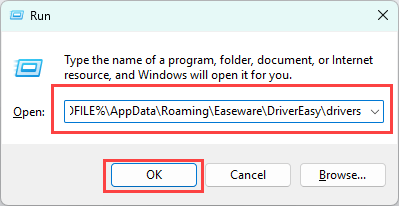
    • Delete all files in this folder.
  3. Reopen Driver Easy: Launch the program again to see if the issue is resolved.

Reinstalling Driver Easy

  1. Remove Driver Easy data:
    • Press Windows key + R again, type %appdata%, and hit Enter.
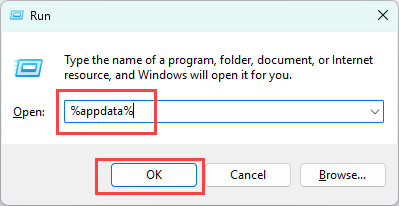
    • Find and delete the Easeware folder.
  2. Reinstall Driver Easy:
    • Download the setup file from here: https://www.drivereasy.com/DriverEasy_Setup.exe
    • Run the installer to install Driver Easy.
  3. Reactivate your program:
    • Open Driver Easy and click the Upgrade button.
    • Enter your license key and click Activate Now (Detailed activation guide: https://www.drivereasy.com/help55/activation-guide/). If you need your key, you can retrieve it from this link: https://www.drivereasy.com/resend-license-key/

If the problem persists, please follow the steps below to contact us:

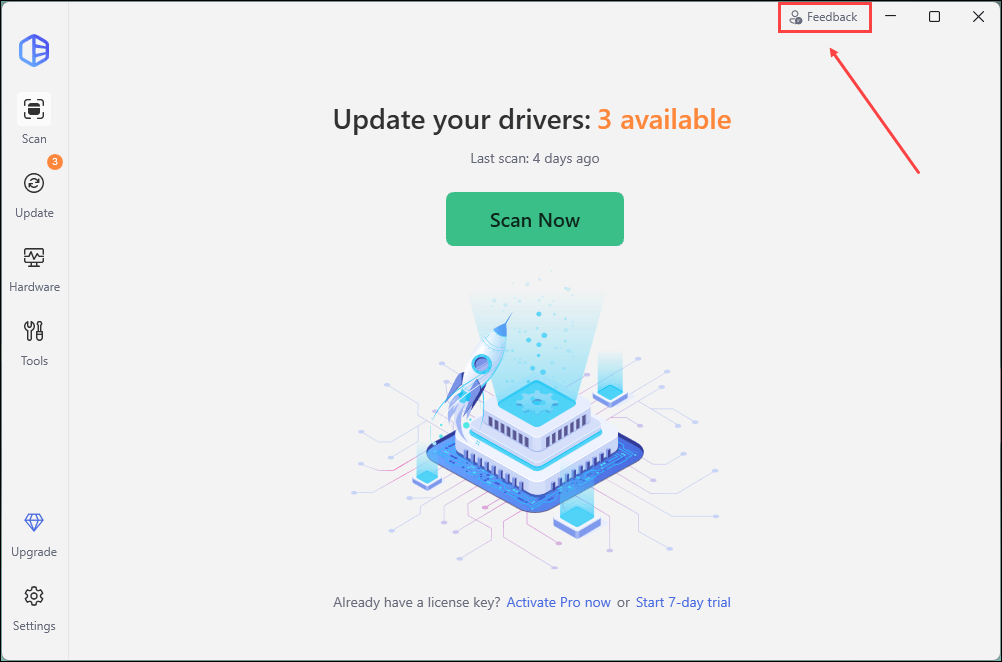
1) Open Driver Easy and click Feedback in the upper-right corner.
2) Fill in the form. Please tell us what problem(s) you’re having with Driver Easy and what you did before and after the problem in detail.
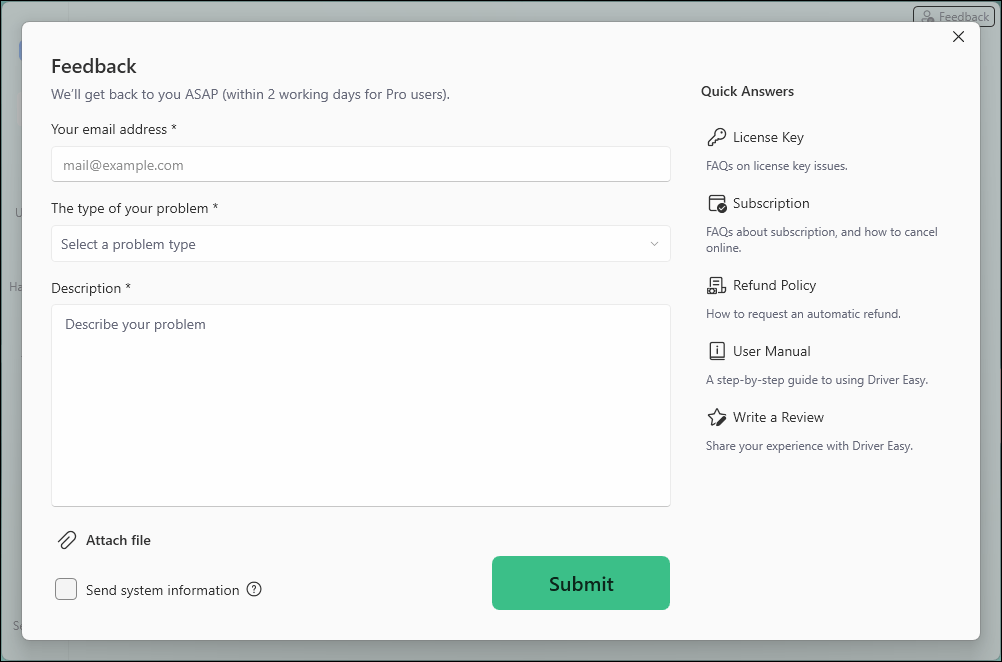
3) If you got any error message or had technical problem, a screenshot of the error and your system information would be greatly appreciated. You can check the box Send system information and click Attach file to upload the screenshot. Click Submit to send your feedback to us.
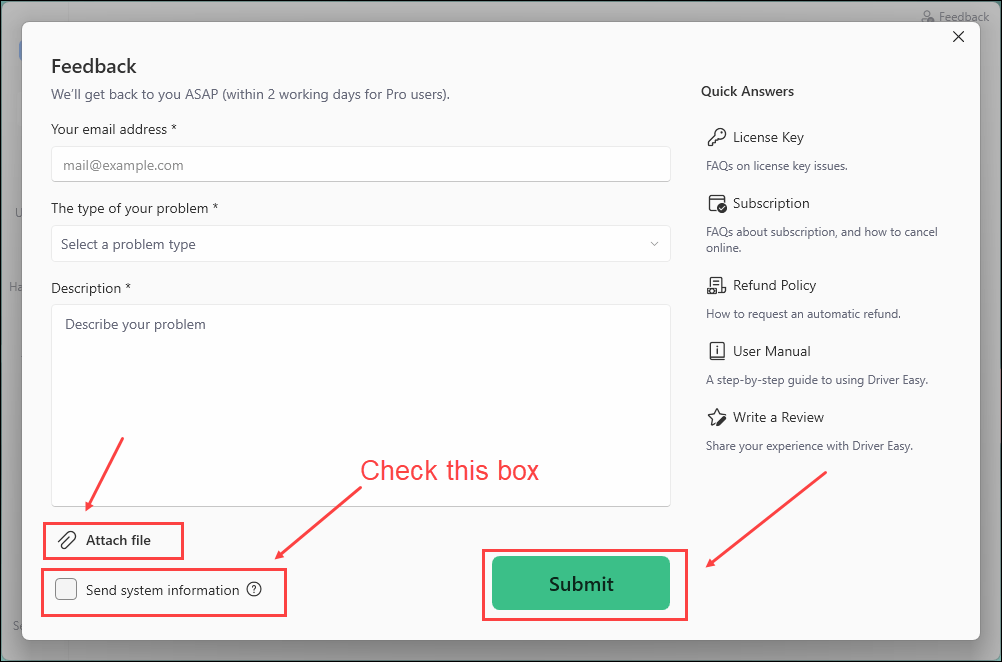
If you are not sure how to take a screenshot, the following link may help. https://www.drivereasy.com/knowledge/how-to-take-a-screenshot-for-windows-users
By checking the box Send system information, the system information of your PC will be sent to us, which helps our technician support team locate and analyze the problem on your PC faster and better. With the system information on your PC, we can provide quick and efficient service.

Go PRO and download drivers 10x faster!

Save countless hours for just $59.95, now just $29.95!

BUY NOW
Was $59.90, now $29.95

To people who have released a key-generated or cracked version of Driver Easy, we believe that you consider this a kind gesture and we respect your work. However, this has caused some trouble on both our side and yours. We have been focusing so much on improving the quality of our product and our service to ensure a higher quality of user experience that we did little to fix the anti-crack loophole in our system in recent years. As you can see for yourself, there is a keygen released a couple of years ago and it still works well right now. We aspire to get out from the crack and anti-crack vicious circle and focus primarily on developing more new features with the resources that we have. We wish you could understand that. We respect your endeavors and such, and all we are asking is that the words “Speed Limited” and the link from remain on the interface of our product. We hope you could understand that the download speed limitation is a have-to-take step, since it involves the payment of a big amount of servers to guarantee a fast download speed.

Did this solve your problem? 3563 people found this helpful.

Support

  • Contact Us
  • FAQ
  • Help for Driver Easy
  • Windows Knowledge Base
  • Driver Certification
  • Resend License Key
  • Uninstall Driver Easy
  • Refund Policy

Feedback

  • Improve Translation
  • Report a Bug
  • Report a Missed Driver
  • Write a Review

Community

  • Affiliate
  • Magazine Covermount
  • Media Coverage
  • Driver Easy Press Kits
  • Non-Profit Organization

Company

  • › AI Tools
  • › About
  • › What's New
  • › EULA
  • › Privacy Policy
  • › Super Easy
  • › Easeware
AppEsteem certification
Norton seal

English / Deutsch / Français / 日本語

Copyright © 2009-2026 Driver Easy is a brand of Easeware. All rights reserved.