Driver Easy
  • Driver update tool
    • Demo & features
    • Download TRIAL version
    • Buy PRO version
  • Pricing
  • Support
    • FAQs
    • Driver Certification
    • Windows Knowledge Base
    • Help for Driver Easy
    • Release Notes
    • Contact Support
  • About
    • About us
    • Become an affiliate
    • Press kits
    • Magazine covermount
    • Media coverage
    • Blog
  • Contact
  • Home
  • Why update your drivers?
  • Manual update
  • Auto update
BUY NOW
X

No file downloaded?

Try again...
Step 1
Step2
Step3
Step4

To

install

Driver Easy

Having a problem with Driver Easy?

  • FAQ
  • FAQs about Driver Easy
    • What if I forget / don’t receive my Driver Easy license key after purchase?
    • Does Driver Easy offer help or support?
    • How can I request a refund when I find Driver Easy doesn’t satisfy me?
    • What is the Home / Business License?
    • What is the Computer Repair Shop’ License?
    • Does Driver Easy work on ARM-based machines?
    • How to use Driver Easy portable version?
    • Will Driver Easy automatically renew my license and charge me for it once the license expires?
    • What happens if I disable automatic renew? (What happens when the license expires?)
    • What is Driver Easy?
    • Is Driver Easy free?
    • Does Driver Easy stay up to date?
    • What does the PRO version of Driver Easy offer?
    • Is Driver Easy Safe?
    • Where are the drivers of Driver Easy from?
    • What if I’m not satisfied with Driver Easy?
    • What is an “Unplugged” device?
  • FAQs about drivers
    • What is a driver?
    • Why do I need the latest drivers?
    • Can’t I just update my drivers manually?
    • Doesn’t Windows Update keep my drivers up to date?
    • Can’t I just check Windows Device Manager to see if I need to update my drivers?
  • FAQs about subscription
    • How to view my subscription details?
    • How to cancel my trial or subscription?
    • How to update my payment method?
    • How to opt out of receiving subscription renewal emails from 2Checkout?
    • My subscription is for 3 computers. How do I download and install Driver Easy Pro on the second computer?
    • What to do if I used the wrong email address?
    • How to cancel pending orders?
  • FAQs about license key
    • What should I do if I haven ‘t received my license key or if I forget / lost my license key?
    • What should I do if I want / don’t want to renew my license key?
    • Can I upgrade my Driver Easy Pro license key to activate more machines?
    • How to remove activated machines for Home / Business license?
  • User Manual
  • Get Started with Driver Easy
    • Install Driver Easy
    • Activate Driver Easy
    • Uninstall Driver Easy
    • Renew Driver Easy License Key
    • Turn On/Off Automatic Renew
    • Update Driver Easy
    • Reinstall Driver Easy
  • Scan
    • Scan Hardware Devices for Missing or Outdated Drivers
  • Update Drivers
    • Update Drivers with the PRO Version of Driver Easy
    • View Driver Details
    • Force Install This Driver
    • Delete Downloaded Driver Update
    • Open Driver Update File Location
    • Roll Back to Previous Driver
    • Uninstall Driver
    • Hide or Show Hidden Driver Update
    • View All Available Driver Versions
  • Hardware Information
    • View Hardware Information
  • Tools
    • Driver Update History
    • Driver Recovery
    • Driver Backup & Restore
    • Driver Uninstall
    • Offline Scan
  • Settings
    • General Program Settings
    • Automatic Scan Scheduler
    • Restore Points
    • Scan for Game Dependencies
    • Internet Connection
    • Hidden Devices
    • Version Update
    • Subscription
  • Support
    • Technical Support for the Pro version of Driver Easy
  • Boost
    • Game Boost
    • System Clean
  • Common Issues
  • Download errors
    • The remote server returned an error: (404) Not Found
    • The remote server returned an error: (416) Requested Range Not Satisfiable
    • The request was aborted: The operation has timed out
    • The remote server returned an error: (403) Forbidden
    • The remote name could not be resolved: ‘dow2.drivereasy.com’
    • The underlying connection was closed: An unexpected error occurred on a send
    • The underlying connection was closed: Could not establish trust relationship for the SSL/TLS secure channel
    • The remote server returned an error: (888) No remaining downloads available
    • The file is damaged, need to re-download
  • Scan errors
    • Error creating the Web Proxy specified in the ‘system.net/defaultProxy’ configuration section
    • The remote name could not be resolved: ‘app1.drivereasy.com’
    • The underlying connection was closed: An unexpected error occurred on a receive
    • Unable to connect to the remote server
  • Restore points
    • Solutions to “Oops” errors
  • Activation errors
    • “Unable to connect to the remote server” when activating Driver Easy
    • An error occurred during activation: Invalid activation request
    • The remote name could not be solved: ‘app.drivereasy.com’
  • License key
    • The remote server returned an error: (886) License Key has expired
  • Program stops working
    • “DriverEasy has stopped working”
  • Others
    • What is Driver Easy Professional (Speed Limited)?
    • How to update your network drivers when your PC doesn’t have a network connection
    • Failed to send your message
  • Backup errors
    • “Could not find file” error when backing up drivers
    • “Illegal Characters in Path” during driver backup

Driver Backup & Restore

By Brinksley Hong
Last updated: 8 hours ago

With Driver Easy Pro, you can back up the device drivers on your computer without hassle and restore them with one click. Here are the step-by-step instructions.

Back Up Drivers

1) Launch Driver Easy and click Tools.
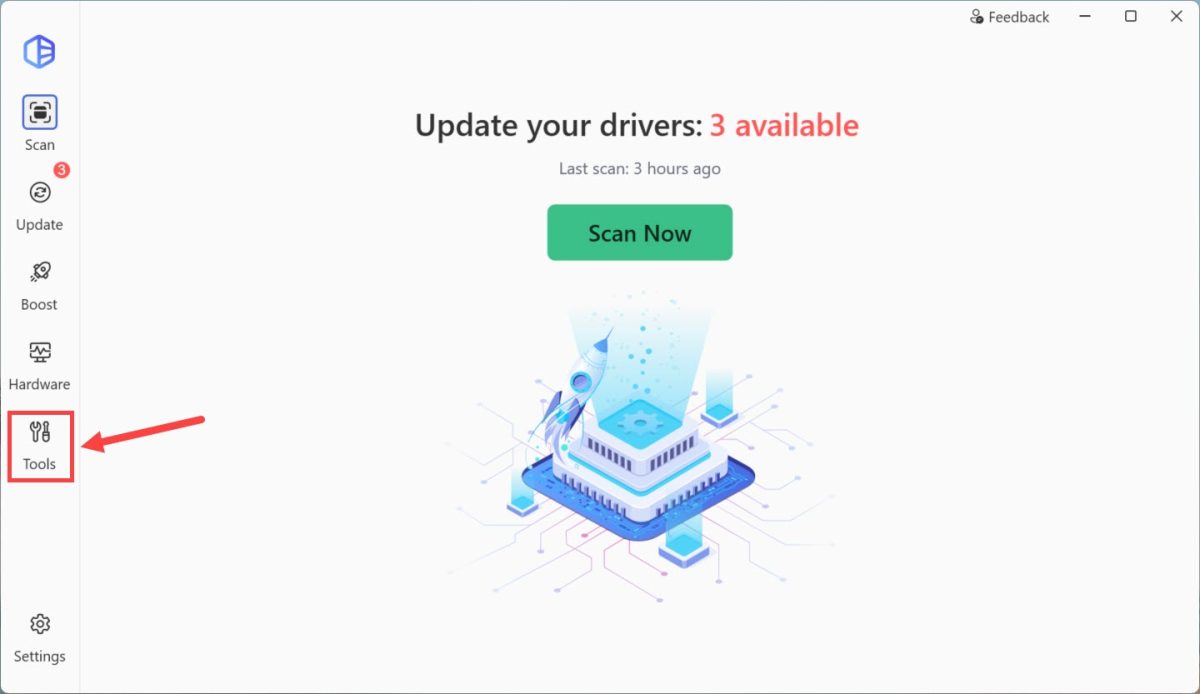
driver easy tools

2) Select the Driver Backup & Restore tab. Then click Back Up Drivers or click Continue to Backup.
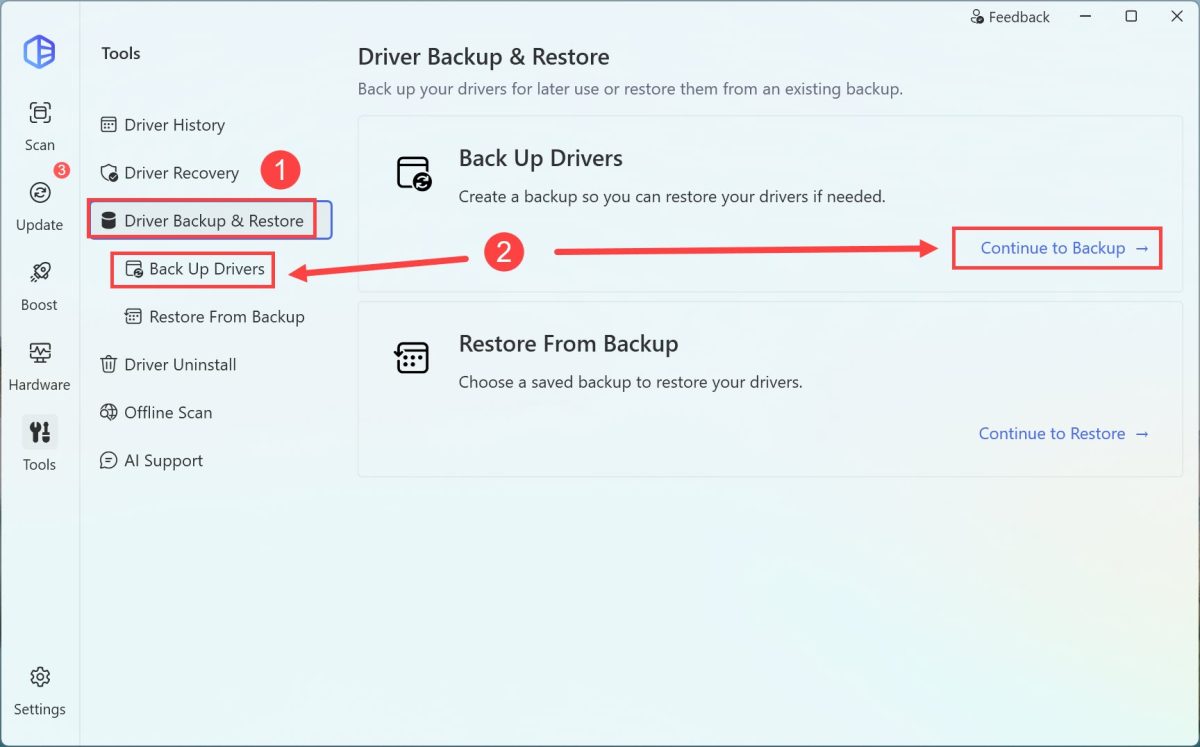
driver easy driver backup

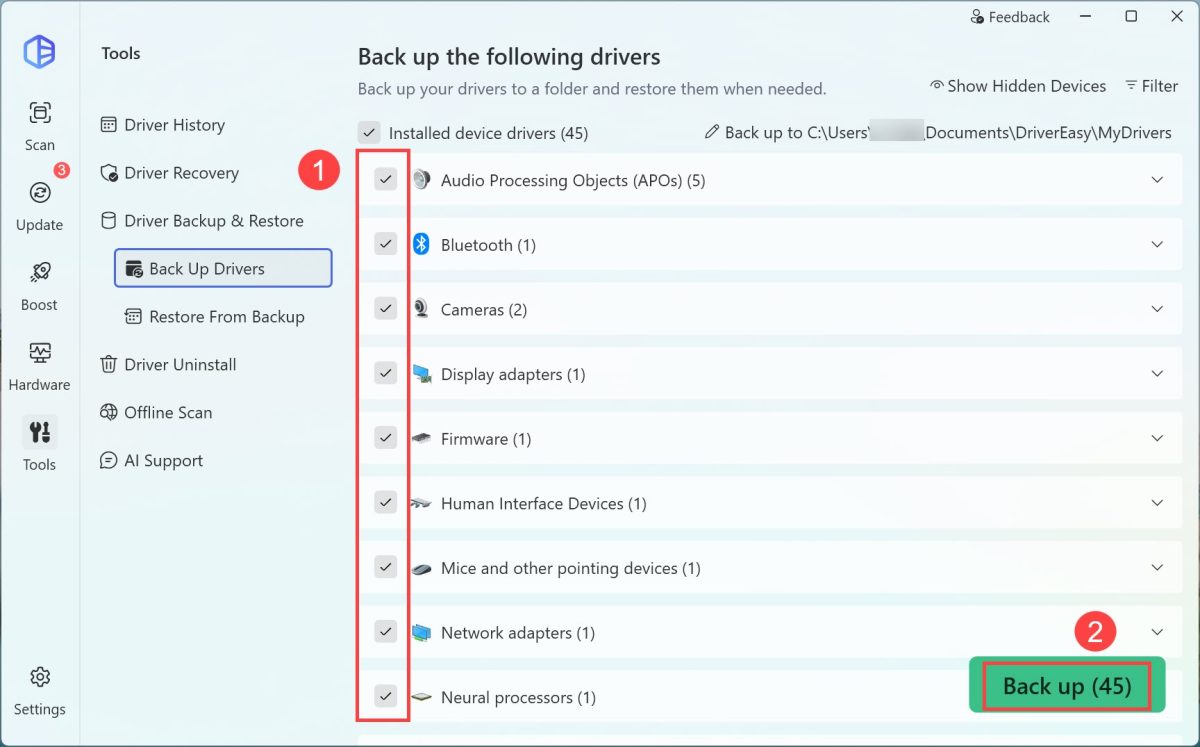
3) Select the drivers you want to back up, then click Back up. The drivers you selected will be backed up to the following path by default:
C:\Users\[your username]\Documents\DriverEasy\MyDrivers.
driver easy driver backup

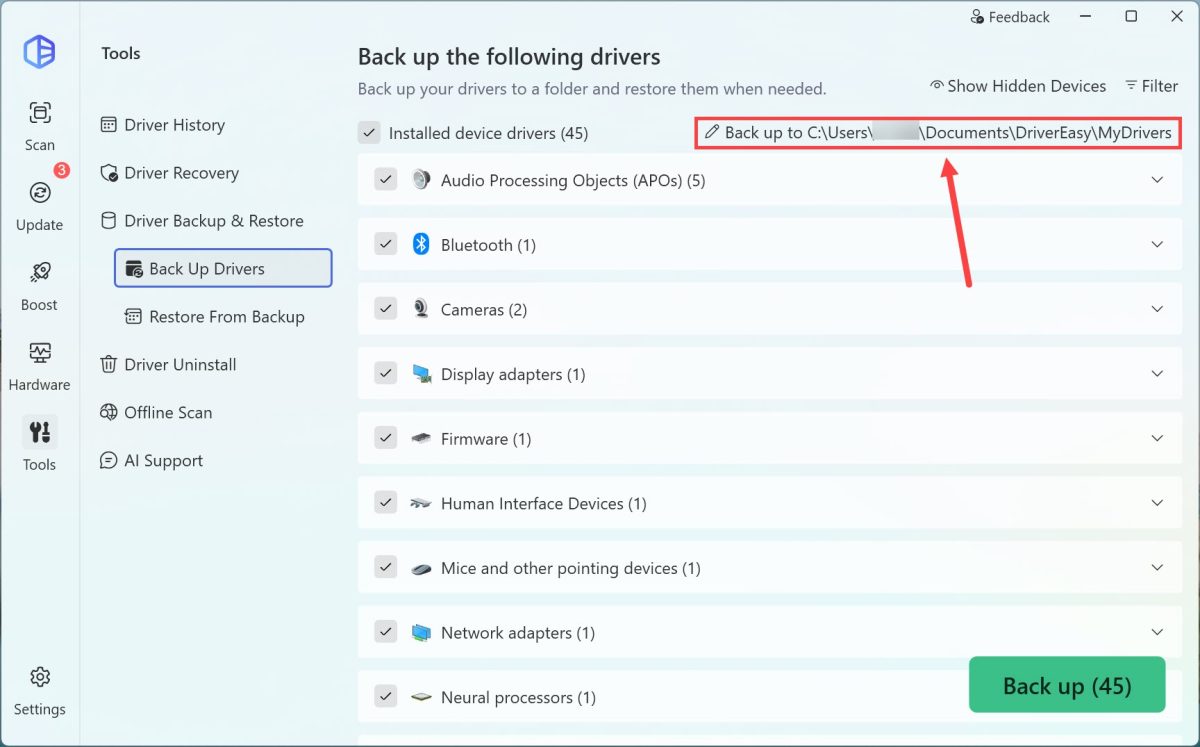
If you’d like to back up the drivers to a different path, just click the current path to change it.
driver easy driver backup

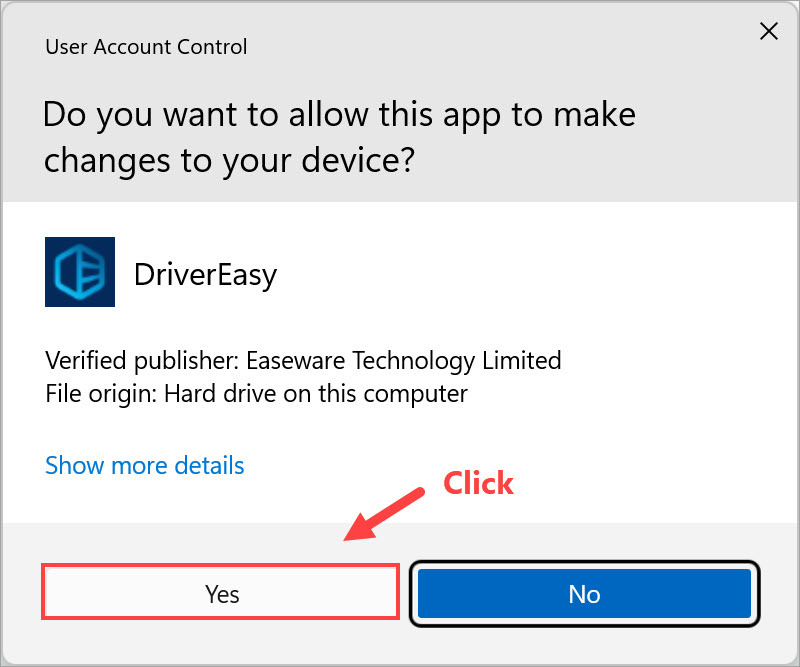
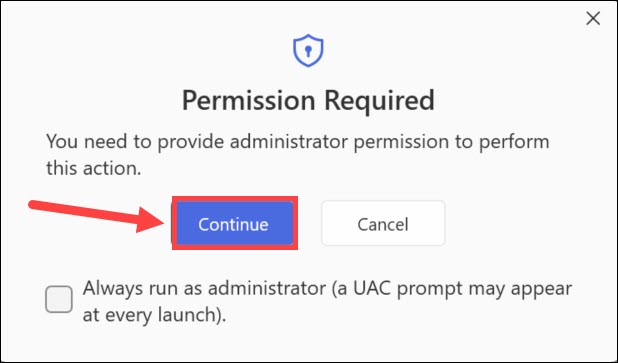
4) If you’re prompted for permission. Click Continue.
driver easy grant permission

5) Click Yes.

Driver Easy click Continure when prompted

6) Wait for the backup process to complete.
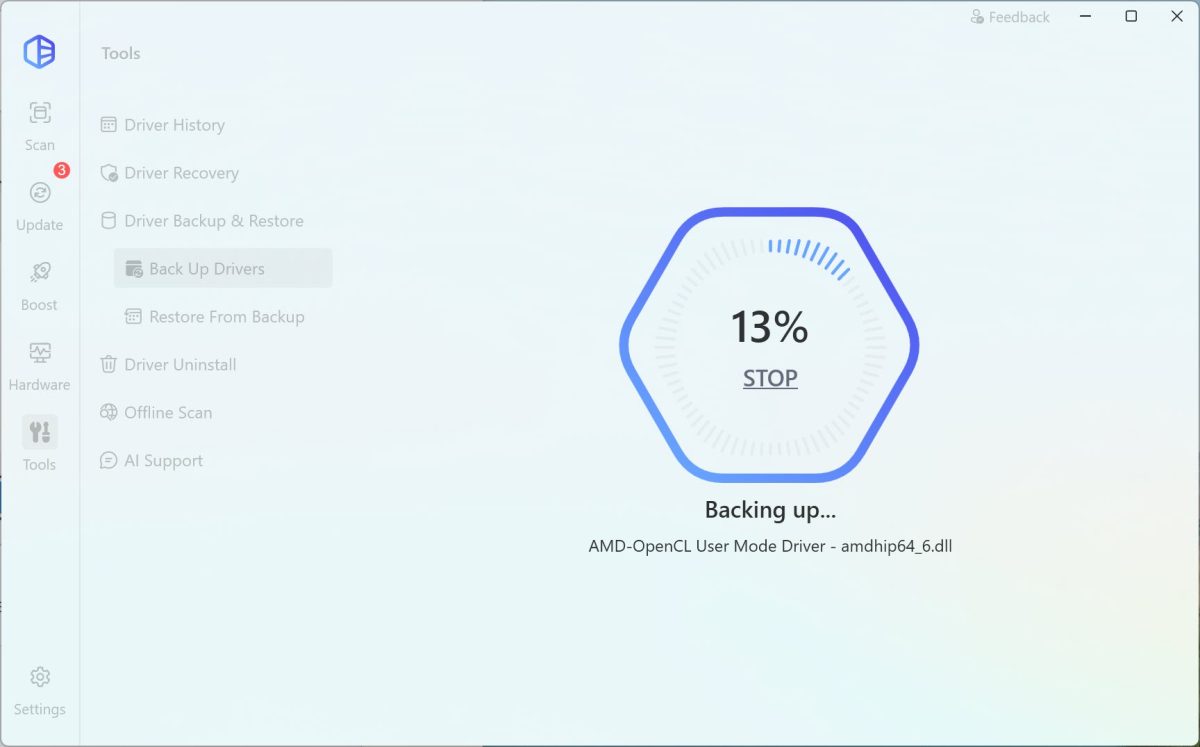
7) Now your drivers have been successfully backed up.

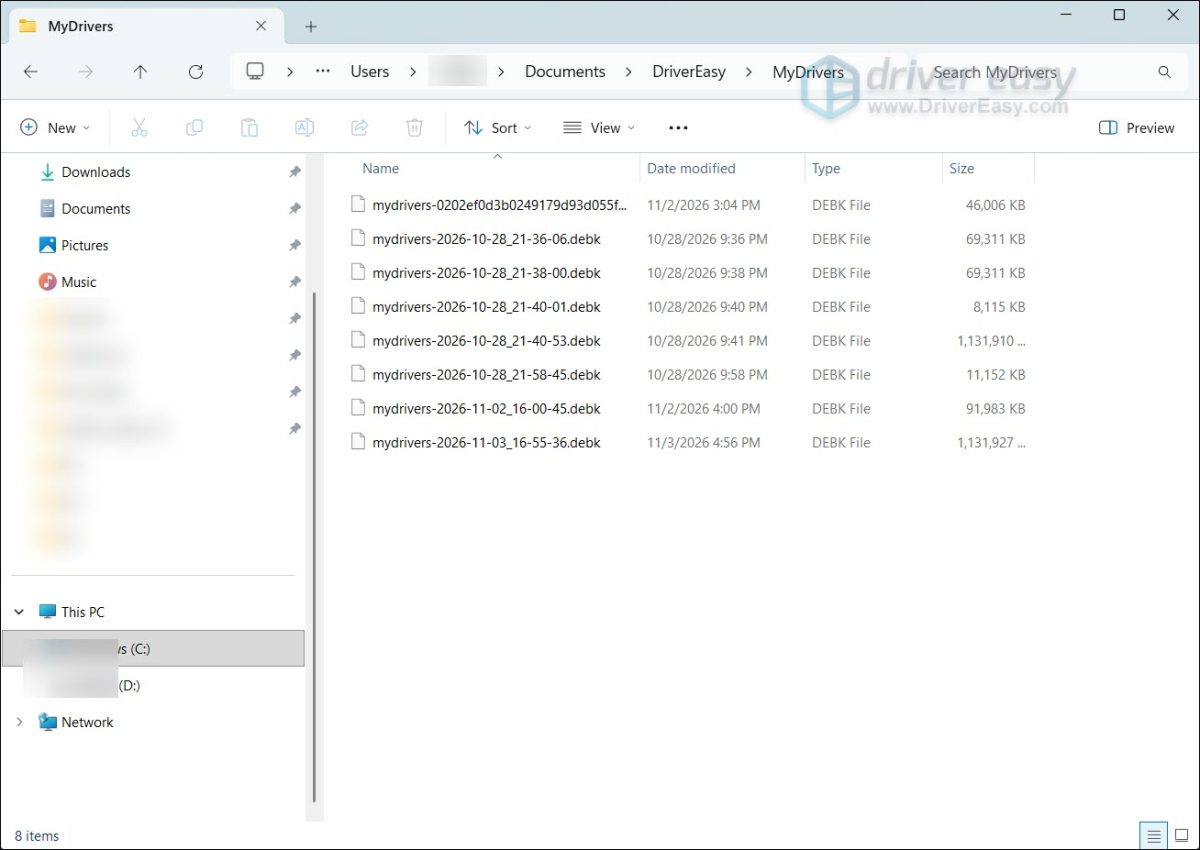
You can open File Explorer to access the backup folder, where you’ll find the driver backups in .debk format. Alternatively, you can view your backup(s) in the Restore From Backup section.
driver easy driver backup

Restore From Backup

1) In Driver Easy, click Tools.

driver easy tools

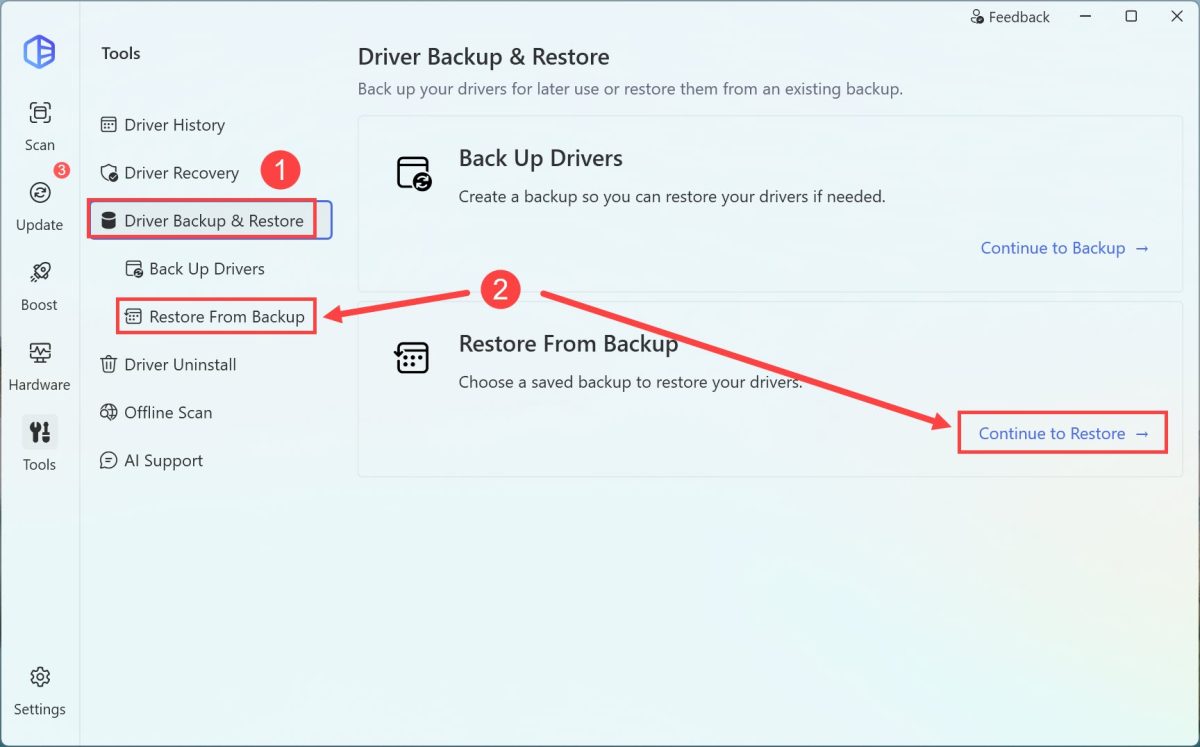
2) Select the Driver Backup & Restore tab. Then click Restore From Backup or Continue to Restore.
driver easy restore driver from backup

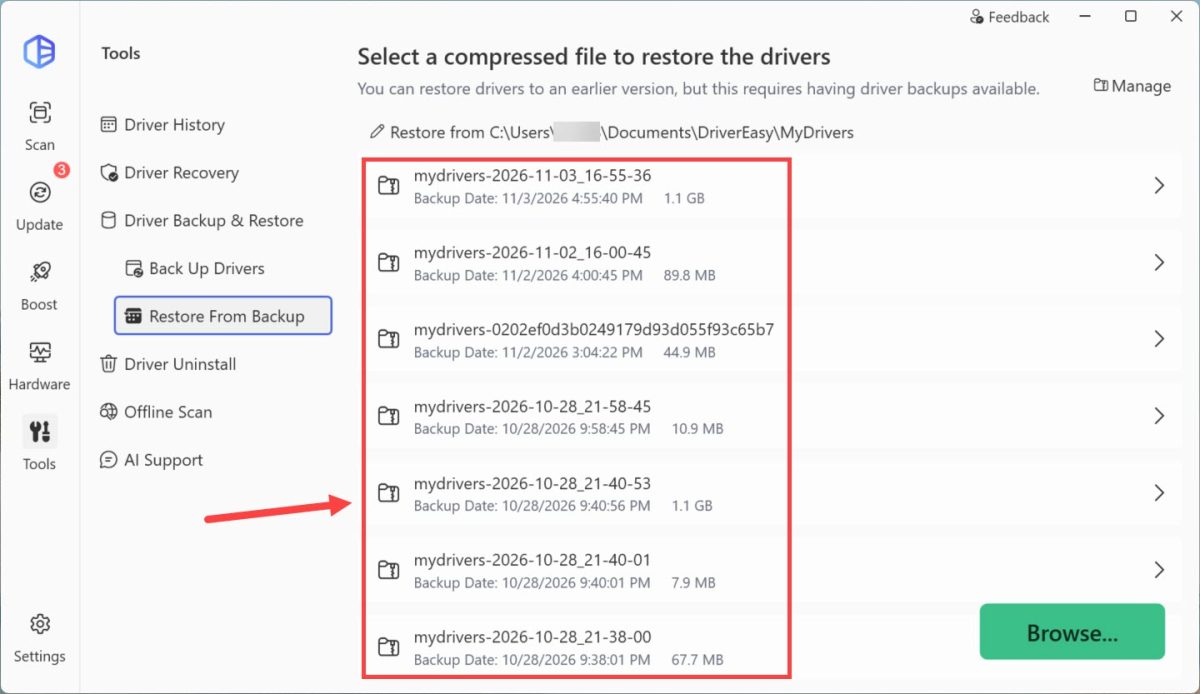
3) Select the result you want to restore.
driver easy restore driver from backup

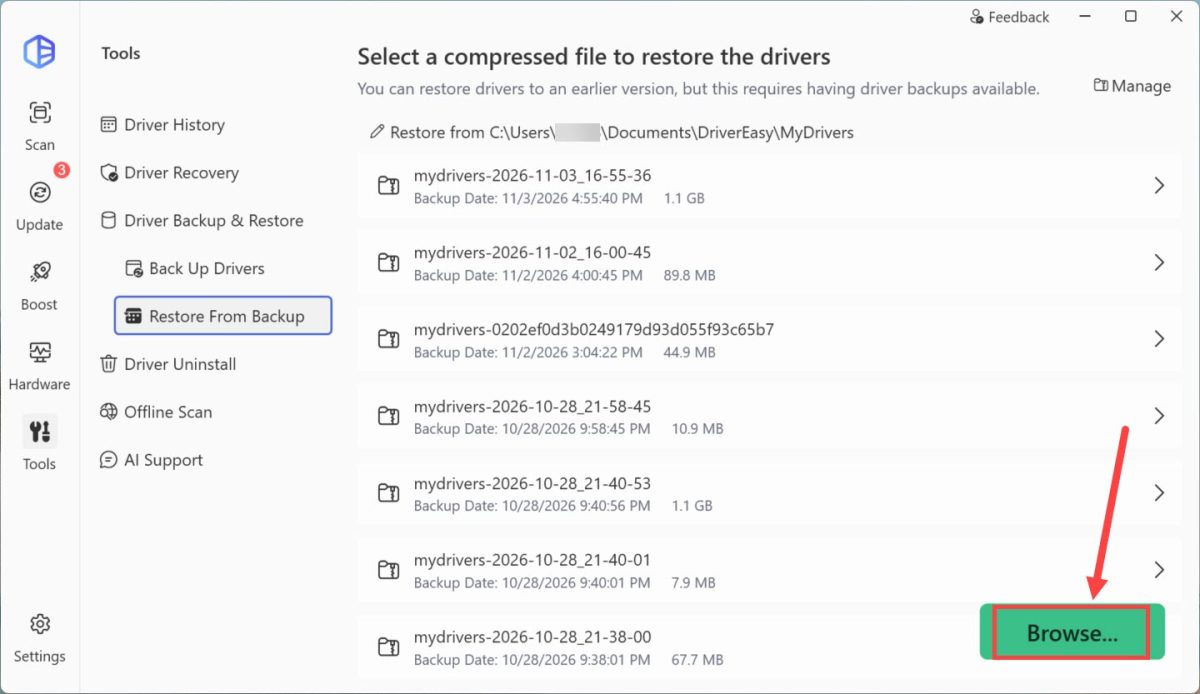
You can also click Browse… to manually choose the driver file. In the pop-up window, choose a driver backup you’re going to restore from, then click Open.
driver easy restore driver from backup

4) If you’re prompted for permission. Click Continue.

driver easy grant permission

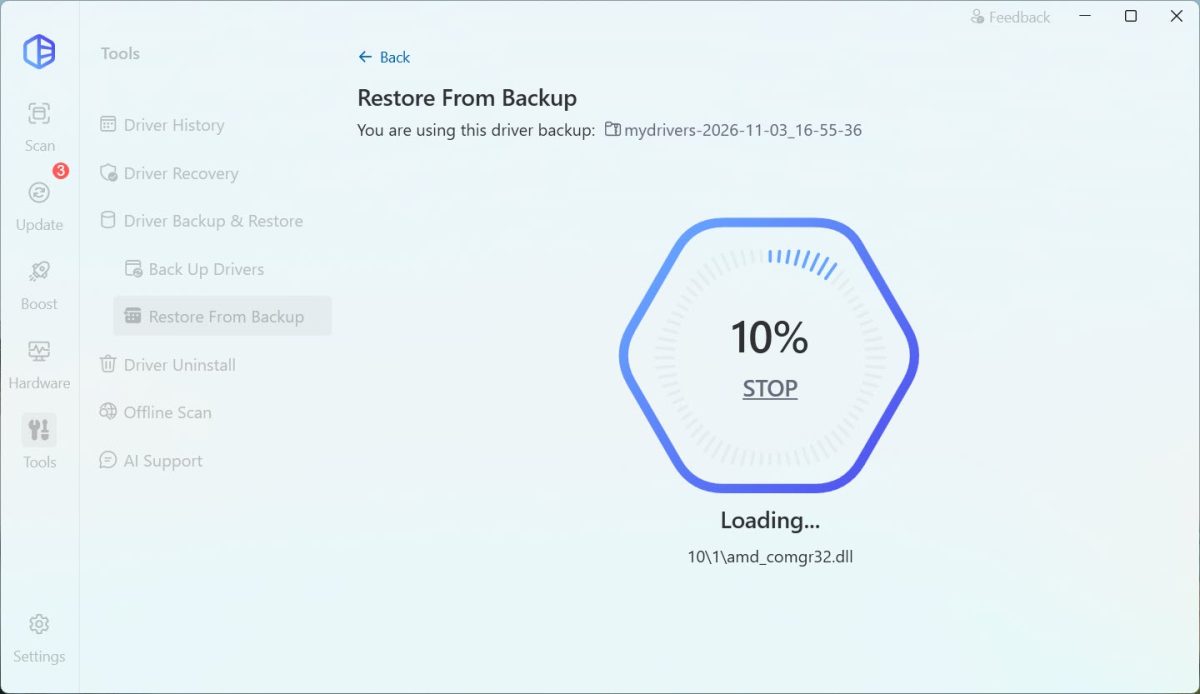
5) Wait for the backup to load.

driver easy restore driver from backup

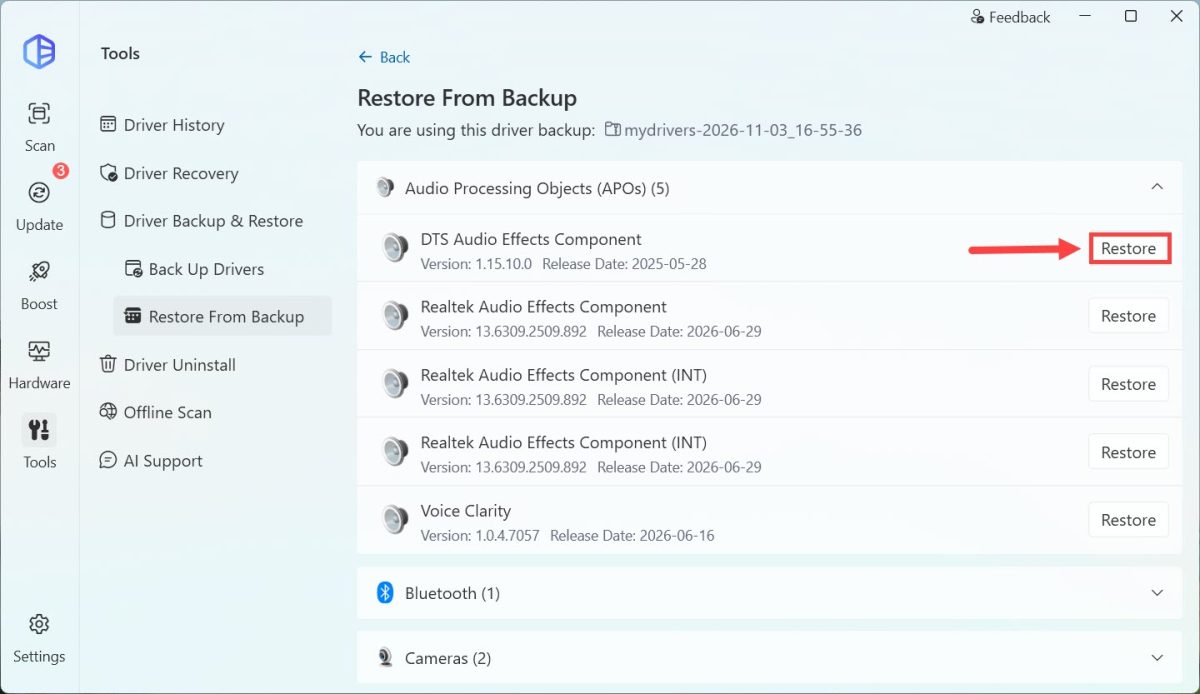
6) Once done, select a driver you’re going to restore, then click Restore.
driver easy restore driver from backup

7) Now your driver has been restored successfully.

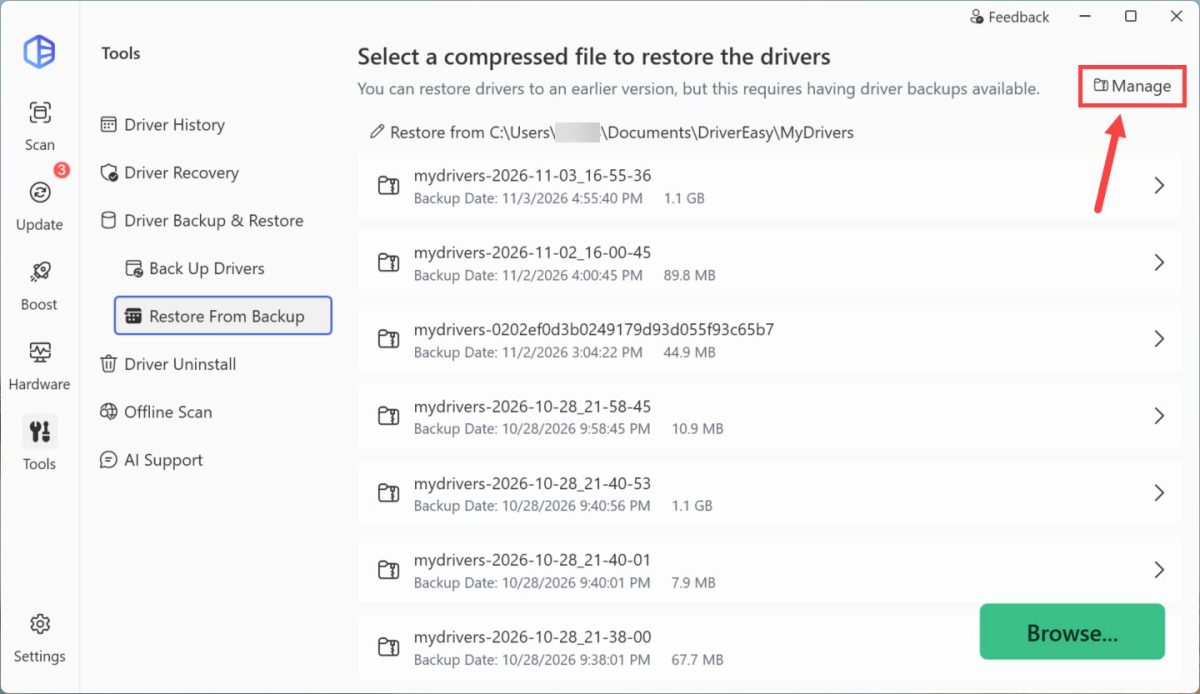
If you want to manage the backup driver files, you can click the Manage button in the top-right corner.
driver easy driver manage backup driver files

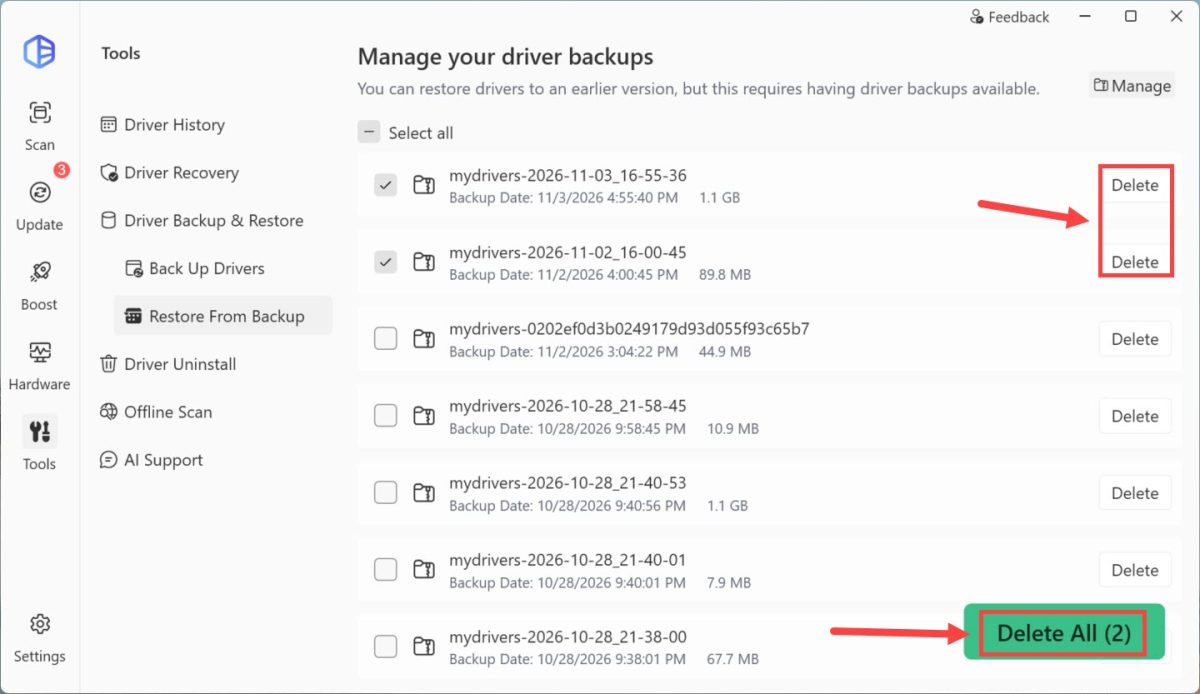
Click the Delete button next to the backup you want to remove, or choose all the backup(s) you want to remove and then click Delete All.
driver easy driver manage backup driver files

Did this solve your problem? 0 people found this helpful.

Support

  • Contact Us
  • FAQ
  • Help for Driver Easy
  • Windows Knowledge Base
  • Driver Certification
  • Resend License Key
  • Uninstall Driver Easy
  • Refund Policy

Community

  • Affiliate
  • Magazine Covermount
  • Media Coverage
  • Driver Easy Press Kits
  • Non-Profit Organization

Company

  • › About
  • › What's New
  • › EULA
  • › Privacy Policy
  • › Super Easy

English / Deutsch / Français / 日本語

Copyright © 2009-2026 Driver Easy is a brand of Easeware. All rights reserved.